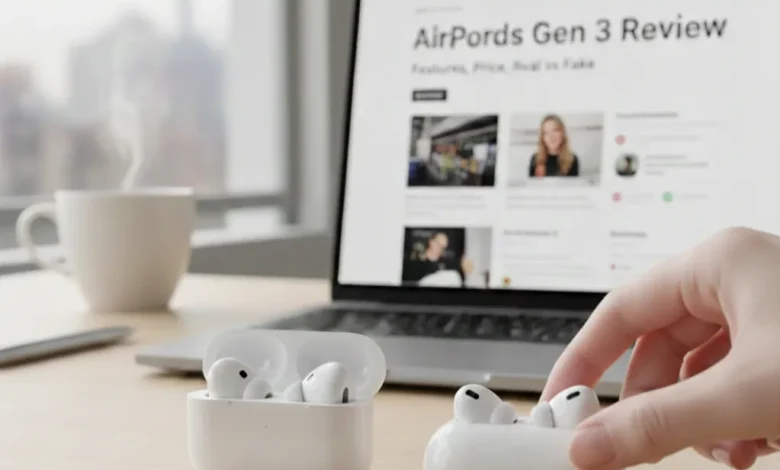
Apple’s AirPods Gen 3 arrived in October 2021 and quickly became one of the most popular wireless earbuds on the planet. Now in 2026, with the AirPods 4 on shelves, many people are still asking: are AirPods Gen 3 worth buying? How do they compare to the newer model? And how do you even tell if you’re holding a real pair?
This guide covers every angle from design and sound quality to noise cancellation, waterproofing, the MagSafe charging case, how to reset them, how to spot fakes, and a detailed AirPods Gen 3 vs Gen 4 breakdown. Whether you’re considering a purchase, already own them, or just trying to troubleshoot, you’ll find your answers here.
| Quick Specs Apple AirPods Gen 3 Released: October 2021 | Chip: Apple H1 | Battery: 6 hrs (30 hrs with case) | Water Rating: IPX4 | ANC: No | Spatial Audio: Yes | Charging: MagSafe / Lightning / Qi | Price: ~$139–$169 |
Table of contents
- Design and Comfort: What Makes AirPods Gen 3 Different
- Sound Quality Spatial Audio and Key Features
- Do AirPods Gen 3 Have Noise Cancellation?
- Are AirPods Gen 3 Waterproof?
- Battery Life and the MagSafe Charging Case
- AirPods Gen 3 Charging Case: What to Know About Replacement
- AirPods Gen 3 vs Gen 4: Full Comparison
- AirPods Gen 3 Box Real vs Fake: How to Spot Counterfeit AirPods
- How to Reset AirPods Gen 3: Step-by-Step Guide
- Final Verdict: Who Are AirPods Gen 3 For?
- FAQs
Design and Comfort: What Makes AirPods Gen 3 Different
Apple made a significant visual shift with the third generation. The stems are noticeably shorter than the AirPods 2, and the earbud housing is more contoured and bulbous closer in appearance to the AirPods Pro, but without the silicone ear tips. This open-ear design is one of the most defining characteristics of the AirPods Gen 3, and it’s something that divides users pretty clearly.
If you have ears that naturally cradle open earbuds, the AirPods Gen 3 will feel secure and comfortable for hours. The lightweight build just 4.28g per earbud means you barely notice them during long listening sessions. However, if your ear canal opening doesn’t naturally grip this shape, they can feel loose or unstable, especially during movement. This is the fundamental trade-off with a tip-less design: there’s no universal seal, so comfort is entirely dependent on your ear anatomy.
Compared to the AirPods 2, the redesigned stem now features a force sensor rather than a tap-sensitive surface. You squeeze the stem to control playback, answer calls, skip tracks, or summon Siri. The force sensor is more reliable than the older tap system, though it still requires a slightly deliberate press to register consistently.
Sound Quality Spatial Audio and Key Features
Apple upgraded the internal audio hardware significantly with the Gen 3. Custom drivers and a high dynamic range amplifier deliver noticeably improved bass response and overall clarity compared to the second generation. The sound profile is balanced clear highs, detailed mids, and more punch in the low end than what the AirPods 2 could produce. In a quiet room, they sound nearly as good as the AirPods Pro, which is impressive for open-ear earbuds without a seal.
Spatial audio with dynamic head tracking is one of the standout features brought over from the Pro lineup. When watching compatible content on an iPhone, iPad, or Apple TV, sound stays anchored to the screen as you move your head, creating a genuinely immersive, almost cinematic listening experience. For anyone who uses AirPods for streaming video, this feature alone represents a meaningful upgrade from earlier generations.
Adaptive EQ is another meaningful addition. The Gen 3 continuously measures the sound in your ear and adjusts mid and low-end frequencies in real time to compensate for your specific ear shape and how the earbuds are sitting. It’s not a dramatic effect, but it does produce more consistent audio quality across different fit positions.
Other notable features include automatic ear detection using a skin-detect sensor, instant pairing with Apple devices via the H1 chip, seamless switching across iPhone, iPad, and Mac, and hands-free Siri activation. Call quality is solid, with an acoustic mesh covering the outward-facing microphone to reduce wind noise.
Do AirPods Gen 3 Have Noise Cancellation?
This is one of the most searched questions about the AirPods Gen 3, and the short answer is: no, AirPods Gen 3 do not have active noise cancellation (ANC).
Apple reserved noise cancellation for the Pro lineup. Because the AirPods Gen 3 use an open-ear design without silicone tips, they don’t form a seal in the ear canal and ANC works by using microphones to detect and counteract incoming sound waves. Without a physical seal to block ambient noise first, the ANC system has much less to work with, making effective noise cancellation nearly impossible in an open-ear form factor.
What this means in practice: in a quiet environment, the AirPods Gen 3 sound excellent. In a noisy space a busy café, a train, an open office ambient sound bleeds in freely. You’ll often find yourself turning up the volume to compensate, which isn’t ideal for hearing health over time. If noise isolation is important to you, the AirPods Pro or the AirPods 4 with ANC are the right choice.
| 💡 Quick Answer: AirPods Gen 3 do NOT have noise cancellation. The first standard AirPods model to include ANC is the AirPods 4 with Active Noise Cancellation, released in September 2024. |
That said, it’s worth noting that the open design does have advantages. You remain naturally aware of your surroundings conversations, traffic, announcements without having to activate a transparency mode. For commuters who prefer situational awareness, or for use during light exercise, this can be a genuine benefit rather than a limitation.
Are AirPods Gen 3 Waterproof?
AirPods Gen 3 are water resistant, but not waterproof and understanding that distinction matters.
Both the earbuds and the charging case carry an IPX4 rating, which means they are protected against water splashing from any direction. Sweat during a workout, light rain, accidental splashes these are all within the IPX4 tolerance. It’s a meaningful upgrade from the AirPods 2, which had no official water resistance rating at all.
However, IPX4 does not mean you can submerge them. Swimming with AirPods Gen 3, leaving them under running water, or using them in heavy rain for extended periods goes beyond what the rating covers. Apple also notes that water resistance is not a permanent condition it can degrade over time with normal wear.
For most everyday use cases gym sessions, morning runs, unexpected rain the Gen 3’s IPX4 rating provides reliable protection. Just don’t mistake resistance for immunity. If your AirPods get significantly wet, dry them off before placing them back in the case.
Battery Life and the MagSafe Charging Case
Battery life on the AirPods Gen 3 is solid for their size. Each earbud delivers up to 6 hours of listening time on a single charge one hour more than the AirPods 2. With the MagSafe charging case providing multiple additional charges, total playback time reaches up to 30 hours. A 5-minute charge in the case adds approximately one hour of listening time, which is genuinely useful when you’re running out the door.
Spatial audio and high-volume listening will reduce these numbers in practice, but under normal listening conditions, most users find the Gen 3 comfortably gets through a full day without needing a top-up.
The MagSafe charging case that comes with the Gen 3 is one of its most appreciated upgrades. It supports three charging methods: MagSafe wireless (magnetically aligns with MagSafe chargers for easy, no-fuss placement), standard Qi wireless charging (works with any Qi-certified pad), and wired via a Lightning connector on the base. The case is compact flatter and wider than the AirPods 2 case, more closely resembling the AirPods Pro case and snaps shut with a satisfying click.
Apple AirPods Gen 3 MagSafe reviews from real users consistently highlight the case as a practical upgrade. The magnetic alignment makes bedside charging effortless, and the case itself feels sturdy and pocketable. One minor note: the status light is on the front of the case rather than inside, making it easy to check charge level at a glance.
AirPods Gen 3 Charging Case: What to Know About Replacement
If your AirPods Gen 3 charging case is lost, damaged, or no longer charging properly, Apple sells replacement cases directly. The MagSafe charging case for AirPods Gen 3 is available through apple.com or at Apple retail stores. As of 2025, replacement cases are priced at around $69–$79 depending on the model and region.
It’s important to note that the AirPods Gen 3 case uses a Lightning connector, not USB-C. If you’re used to the USB-C ecosystem (common on newer iPhones and the AirPods 4 case), this means keeping a Lightning cable available specifically for the Gen 3 case unless you use wireless charging exclusively.
When buying a replacement case, always purchase directly from Apple or an Apple Authorized Reseller. Third-party cases that claim to be compatible often lack MagSafe functionality, may charge slowly, and in some cases can void the warranty on your earbuds. The genuine Apple case also comes with the same IPX4 water resistance rating as the original.
If you need a replacement case and your AirPods are still under warranty or covered by AppleCare+, contact Apple Support first depending on the circumstances, replacement may be covered at no cost.
AirPods Gen 3 vs Gen 4: Full Comparison
Apple released the AirPods 4 in September 2024, making the Gen 3 the outgoing model. If you’re deciding between the two, here’s an honest breakdown of what actually changed and whether those changes justify the price difference.
| Feature | AirPods Gen 3 | AirPods 4 (standard) | AirPods 4 with ANC |
| Release Date | October 2021 | September 2024 | September 2024 |
| Chip | Apple H1 | Apple H2 | Apple H2 |
| Active Noise Cancellation | No | No | Yes |
| Transparency Mode | No | No | Yes |
| Battery (earbuds) | 6 hours | 5 hours | 5 hours (4 with ANC) |
| Battery (with case) | 30 hours | 30 hours | 30 hours |
| Water Resistance | IPX4 | IP54 | IP54 |
| Charging Case Port | Lightning | USB-C | USB-C |
| Wireless Charging | MagSafe + Qi | Qi only | MagSafe + Qi |
| Spatial Audio | Yes | Yes (improved) | Yes (improved) |
| Earbud Size | Larger/bulkier | Smaller/slimmer | Smaller/slimmer |
| Price (approx.) | ~$139 | ~$129 | ~$179 |
Are AirPods Gen 3 and Gen 4 the Same Size?
No, they are not the same size. The AirPods 4 earbuds are noticeably smaller and slimmer than the Gen 3. Apple refined the earbud shape for the 4th generation using extensive data from 3D photogrammetry and laser mapping of thousands of ear shapes. The result is a more tapered, compact form factor that many users find sits more securely in the ear canal opening.
The Gen 3 housing is larger and more rounded some users love the secure feeling this gives, while others find it too bulky for their ear shape. If ear comfort was a pain point with the Gen 3, the Gen 4’s redesigned shape is worth trying before deciding.
The charging cases are also different sizes. The Gen 4 standard case is smaller and more discreet. However, unlike the Gen 3 MagSafe case, the standard AirPods 4 case does not support wireless charging only the AirPods 4 with ANC model gets a MagSafe-compatible case.
AirPods Gen 3 vs Gen 4: Which Should You Buy?
If you can find AirPods Gen 3 at a significant discount which is common now that they’ve been succeeded they remain an excellent pair of earbuds for Apple ecosystem users. The sound quality, spatial audio, MagSafe case, and battery life are all still competitive in 2025.
However, if you’re buying at full price, the standard AirPods 4 ($129) is better value it’s cheaper, has a newer chip, improved dust resistance (IP54 vs IPX4), and a more refined fit. The AirPods 4 with ANC ($179) is the clear choice if noise cancellation is important to you, and it comes in at the same price the Gen 3 originally launched at.
AirPods Gen 3 Box Real vs Fake: How to Spot Counterfeit AirPods
The AirPods Gen 3 is one of the most counterfeited consumer electronics products in the world. Fake pairs can look convincingly real in product photos, but once you know what to check, the differences become obvious. Here’s what to look for starting from the box.
Check the Box
On a genuine AirPods Gen 3 box, the Apple logo and the word ‘AirPods’ are printed in a flat, matte gray not reflective or glossy. Fake boxes often use shiny or slightly metallic text that catches the light. Check the font weight too: every line of text on the real box has consistent thickness. Fakes frequently have slightly bolder or thinner characters, and occasionally include typos such as ‘Airpods’ instead of ‘AirPods’ (notice the lowercase ‘p’).
The inner box and its lid should fit together snugly with even resistance. If the inner box slides out too easily or the lid doesn’t align perfectly with consistent gaps around all edges, this is a warning sign. On authentic boxes, the fit is precise and feels solid.
Check the Earbuds
Look at the ‘L’ and ‘R’ lettering on each earbud. On genuine AirPods Gen 3, these letters are small, thick, and slightly boxy. Fake AirPods often have thinner, larger, or more stylized lettering. The charging hole at the base of each earbud should be short and wide on the original counterfeits often have a narrower, longer charging hole.
Check the LED indicator light on the case. On genuine AirPods Gen 3, the charging case shows only a green or amber status light on the front. If you see blue lights anywhere especially on the earbuds themselves these are fake. Blue indicator lights do not appear on any genuine AirPods model.
The Serial Number Test Most Reliable Method
The most definitive way to verify authenticity is through the serial number. Find it in one of these places: inside the lid of the charging case, on the underside of the case, or on the original box’s barcode label. Then go to checkcoverage.apple.com and enter the number. A genuine pair will return product details, warranty status, and eligible services. If the number is not recognized, or if it returns information for a completely different product, you have a counterfeit.
| ⚠️ Warning: Some high-quality fakes use stolen serial numbers from genuine products. If the number validates but the product still feels off sound quality is poor, the connection popup doesn’t show the AirPods icon, or the volume slider shows a Bluetooth icon instead of an AirPods graphic trust your instincts and compare against the other physical checks. |
The iPhone Connection Test
When you open a genuine AirPods Gen 3 case next to a connected iPhone, a setup animation appears on screen. On a real pair, the iOS volume slider shows an AirPods icon when they’re connected. On fake AirPods, this icon is replaced by a generic Bluetooth or speaker icon. This is one of the fastest and most reliable software-based authenticity checks available.
Also Read: Geekzilla Tech Honor Magic 5 Pro
How to Reset AirPods Gen 3: Step-by-Step Guide
Resetting your AirPods Gen 3 is the fix for most common issues connection problems, audio imbalance, Bluetooth pairing failures, or preparing the earbuds for a new owner. The process is straightforward once you know the exact steps.
Step 1: Forget the AirPods From Your iPhone
Place your AirPods Gen 3 in the charging case and open the lid. On your iPhone, go to Settings, then tap Bluetooth. Find your AirPods in the ‘My Devices’ list and tap the info icon (ⓘ) next to them. Select ‘Forget This Device’ and confirm. This removes the AirPods from your Apple Account and all associated devices.
Step 2: Close the Case and Wait
Close the charging case lid and wait at least 30 seconds. This pause allows the internal state to clear fully before the reset sequence begins.
Step 3: Open the Lid and Press the Setup Button
Open the charging case lid. On the back of the case, locate the small circular setup button. Press and hold it for approximately 15 seconds. Watch the status light on the front of the case it will first flash amber, then flash white. The white flash is your confirmation that the reset was successful. Release the button.
Step 4: Re-Pair Your AirPods
With the case open and your AirPods inside, hold the case close to your iPhone. A setup animation should appear on screen. Tap Connect and follow the on-screen instructions. Your AirPods will pair as if fresh out of the box, and your settings and preferences will need to be configured again.
| 🔧 Troubleshooting: If the status light doesn’t flash amber then white it stays green or doesn’t change make sure the AirPods case has enough charge (plug it in for 10 minutes first), that you’ve completed Step 1 (forgetting the device), and that you’re holding the button for a full 15 seconds without releasing early. |
Final Verdict: Who Are AirPods Gen 3 For?
Apple AirPods Gen 3 remain a genuinely capable pair of wireless earbuds in 2025. The spatial audio, MagSafe charging case, improved sound quality over the Gen 2, and IPX4 water resistance combine to make them a well-rounded product for everyday Apple users.
Their biggest limitations are the lack of active noise cancellation and the divisive open-ear fit that won’t work for every ear shape. If you primarily listen in quiet environments and want comfortable, effortless earbuds that work seamlessly with your iPhone without dealing with ear tips, the Gen 3 still earns its place.
FAQs
Do AirPods Gen 3 have noise cancellation?
No. AirPods Gen 3 do not have active noise cancellation. The open-ear design without silicone tips means ambient sound passes through freely. If you need ANC, look at the AirPods Pro 2 or the AirPods 4 with Active Noise Cancellation.
Are AirPods Gen 3 waterproof?
They are water resistant, rated IPX4, which means they can handle sweat, splashes, and light rain from any direction. They are not waterproof and should not be submerged. Water resistance can also degrade over time with normal wear.
Are AirPods Gen 3 and 4 the same size?
No. The AirPods 4 earbuds are smaller and more tapered. The Gen 3 has a larger, more rounded housing. The Gen 4’s refined shape generally provides a more secure fit, especially for users who found the Gen 3 too bulky.
How do I reset my AirPods Gen 3?
Place them in the case, forget the device in iPhone Bluetooth settings, close the lid for 30 seconds, then open the lid and hold the setup button on the back of the case for 15 seconds until the light flashes amber then white. Full steps are covered in the section above.
How do I spot fake AirPods Gen 3 from the box?
Key checks: the Apple logo and text should be matte gray (not shiny), the inner box should fit snugly, and there should be no typos like ‘Airpods’ with a lowercase ‘p’. On the earbuds, the L/R lettering should be small and boxy.
Can I replace just the AirPods Gen 3 charging case?
Yes. Apple sells the MagSafe charging case for AirPods Gen 3 separately through its website and retail stores. Always buy directly from Apple or an Apple Authorized Reseller to ensure MagSafe compatibility and proper water resistance.