
Managing software in a large organization is not as simple as installing and updating apps. Companies use hundreds or even thousands of software tools across computers, servers, and cloud systems. Without proper visibility, IT teams often do not know what software is installed, which versions are running, or whether licenses are being used correctly. This lack of control can lead to security risks, compliance issues, and unnecessary costs.
Corporate Software Inspector is designed to solve this exact problem. It helps organizations discover, track, and analyze software across their entire IT environment. Instead of guessing or relying on manual checks, companies can use accurate data to make better decisions. This article explains what is it how it,s works, why enterprises use it, and how it supports compliance, security, and software asset management in a practical way.
Table of contents
- What Is Corporate Software Inspector?
- Why Enterprises Need Software Inspection Tools
- Key Features of Corporate Software Inspector
- How Corporate Software Inspector Works
- Corporate Software Inspector and IT Compliance
- Security Benefits of Using Corporate Software Inspector
- Integration with Enterprise IT Systems
- Corporate Software Inspector in Software Asset Management
- Reporting and Analytics Capabilities
- Common Use Cases
- Benefits and Limitations
- Corporate Software Inspector vs Similar Tools
- Conclusion
- FAQs
What Is Corporate Software Inspector?
Corporate Software Inspector is an enterprise-level tool used to identify and analyze software installed across an organization’s systems. It scans computers, servers, and virtual environments to collect detailed information about applications, versions, publishers, and usage.
The main purpose of this tool is to give IT teams full visibility into their software landscape. It helps answer important questions such as what software is installed, where it is running, and whether it is up to date. This information is essential for managing licenses, reducing risk, and maintaining control over corporate IT assets.
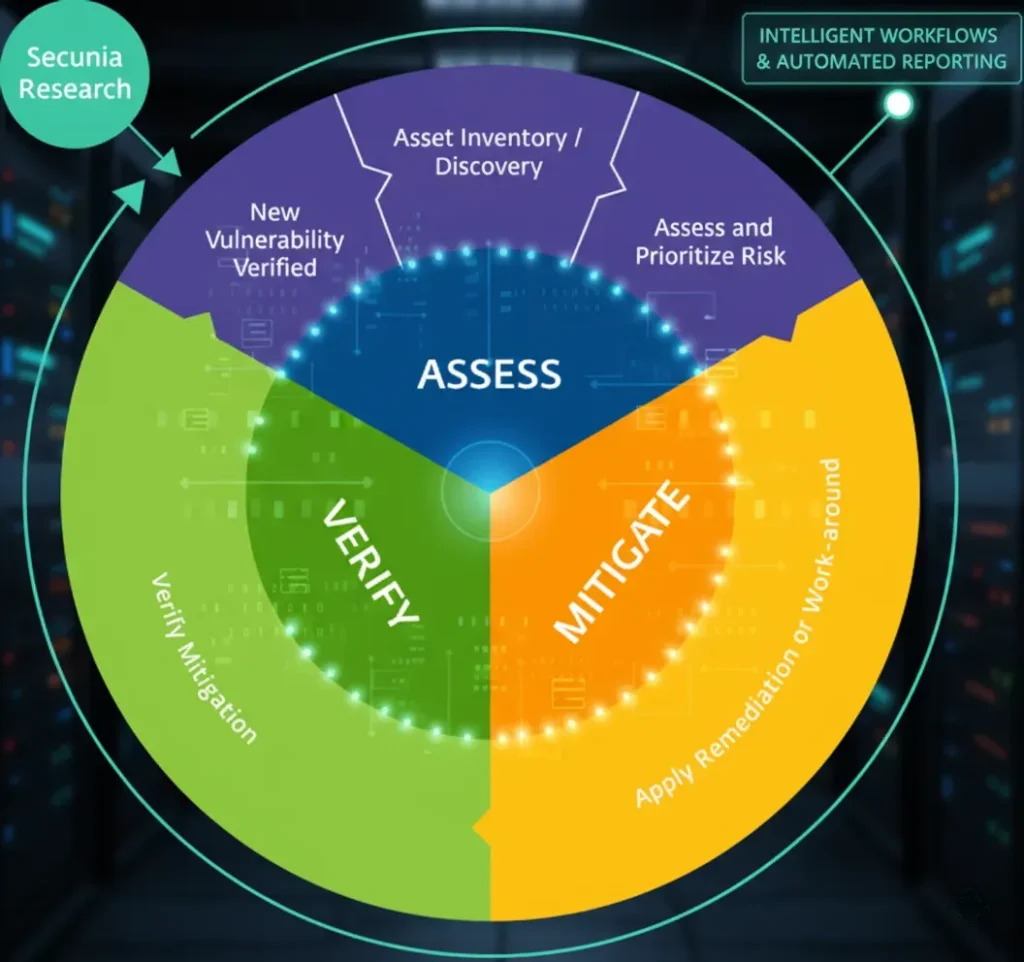
Why Enterprises Need Software Inspection Tools
Modern organizations operate in complex IT environments. Employees install tools for productivity, developers use specialized software, and systems rely on third-party applications to function properly. Over time, this creates software sprawl.
Without a software inspection tool, companies face several challenges. Unknown or unauthorized software can create security vulnerabilities. Outdated applications may expose systems to cyberattacks. License misuse can result in legal and financial penalties during audits. This Software helps us to prevent these issues by providing accurate and up-to-date software intelligence.
Key Features of Corporate Software Inspector
One of the strongest advantages of Corporate Inspector is automated discovery. The tool scans systems and identifies installed software without requiring manual input. It captures details such as application names, versions, publishers, and installation paths.
It also helps detect outdated or unsupported software. By highlighting applications that need updates or replacements, IT teams can reduce security risks. Centralized reporting allows decision-makers to view software data in one place, making it easier to manage large environments efficiently.
How Corporate Software Inspector Works
This corporate works by scanning endpoints and servers within the organization. Depending on the deployment model, it may use lightweight agents or remote scanning methods to collect data.
Once the scan is complete, the collected information is sent to a central system where it is processed and organized. The tool then generates reports that show what software is installed, where it is located, and how it aligns with company policies. This process turns raw data into actionable insights for IT and compliance teams.
Corporate Software Inspector and IT Compliance
Software compliance is a major concern for enterprises. Vendors often conduct audits to ensure organizations are using software according to license agreements. Without accurate data, companies may overpay for licenses or face penalties for non-compliance.
Corporate Software Inspector supports compliance by providing a clear inventory of installed software. It helps organizations compare actual usage against licensed entitlements. This reduces audit stress and ensures that companies can respond confidently when vendors request proof of compliance.
Security Benefits of Using Corporate Software Inspector
Security risks often come from unknown or outdated software. Applications that are no longer supported may contain vulnerabilities that attackers can exploit. In this way it helps identify these risks early.
By knowing exactly which software is running in the environment, security teams can prioritize patching and updates. They can also detect unauthorized applications that may bypass security controls. This visibility strengthens the overall security posture of the organization.
Also Read: information about foxtpax software Is It Safe or Risky?
Integration with Enterprise IT Systems
Corporate Software Inspector is designed to work within existing enterprise IT ecosystems. It can integrate with asset management platforms, security tools, and IT service management systems.
This integration allows organizations to use software inspection data across multiple workflows. For example, vulnerability management teams can use the data to identify risky applications, while finance teams can use it to optimize software spending. Integration ensures that software data is not isolated but actively supports business operations.
Deployment Models and Implementation
Organizations can deploy Corporate Software Inspector in different ways depending on their infrastructure. Some environments use agent-based scanning, where a small component runs on each system. Others prefer agentless scanning for reduced system impact.
The tool supports both on-premise and cloud-based environments. Implementation typically involves defining scan targets, configuring data collection rules, and validating results. While initial setup may require planning, the long-term benefits outweigh the effort involved.
Corporate Software Inspector in Software Asset Management
Software Asset Management focuses on tracking and optimising software investments. So it plays a critical role in this process by providing accurate and reliable data.
With clear visibility into installed software, organizations can eliminate unused applications, avoid duplicate purchases, and negotiate better licensing terms. Over time, this leads to significant cost savings and better control over IT budgets.
Reporting and Analytics Capabilities
Corporate Software Inspector provides reporting tools that help organizations understand their software environment. Reports can show software usage trends, compliance status, and potential risks.
These insights help IT leaders make informed decisions. Instead of relying on assumptions, they can base strategies on real data. Clear reporting also helps communicate technical information to non-technical stakeholders.
Common Use Cases
Enterprises use this tool in many scenarios. During software audits, it provides accurate data to support compliance. In mergers and acquisitions, it helps assess the combined software environment.
It is also useful for security assessments, where teams need to identify outdated or risky software quickly. In daily operations, it supports routine IT inventory management and cleanup efforts.
Benefits and Limitations
The main benefits of Corporate Software Inspector include improved visibility, better compliance, stronger security, and optimized software spending. It helps organizations move from reactive management to proactive control.
However, it is primarily designed for enterprise use. Smaller organizations may find it complex or costly. Like any advanced tool, it also requires proper configuration and ongoing management to deliver maximum value.
Best Practices for Using this Software
To get the best results, organizations should run regular scans and keep data updated. Validating and cleaning software data ensures accuracy. Aligning reports with business goals helps stakeholders understand the value of the tool.
Training IT staff on how to interpret and act on the data is also important. A tool is only effective when teams know how to use it properly.
Corporate Software Inspector vs Similar Tools
While many software discovery tools exist, Corporate Software Inspector stands out for its enterprise focus and detailed inspection capabilities. It is especially useful for organizations with complex environments and strict compliance requirements.
Other tools may offer basic inventory features, but Corporate Software Inspector provides deeper insights that support strategic IT management and long-term planning.
Conclusion
Corporate Software Inspector is a powerful solution for organizations that need full visibility into their software environment. It helps enterprises manage compliance, reduce security risks, and control software costs through accurate data and reporting.
For companies operating at scale, manual software tracking is no longer practical. Tools like this enable smarter decision-making and stronger IT governance. When used correctly, it becomes an essential part of modern enterprise IT management.
FAQs
What does Corporate Software Inspector do?
It scans systems to identify installed software, versions, and usage across an organization.
Is Corporate Software Inspector suitable for small businesses?
It is mainly designed for medium to large enterprises with complex IT environments.
How does it help with software compliance?
It provides accurate software inventory data to support audits and license management.
Does Corporate Software Inspector improve security?
Yes, it helps identify outdated or unauthorized software that may pose security risks.
Is Corporate Software Inspector part of Flexera?
Yes, it is associated with Flexera’s enterprise software management solutions.