I spent three months on a software project that had no component classification system. Nobody agreed on what belonged where. Business logic lived inside the UI layer. Database queries ran inside frontend components. Every new feature broke three existing ones. The project cost twice its original budget.
Classifying software application components correctly from the start prevents exactly that.
This guide explains how to classify software applications components practically, clearly, and with real examples you can apply today.
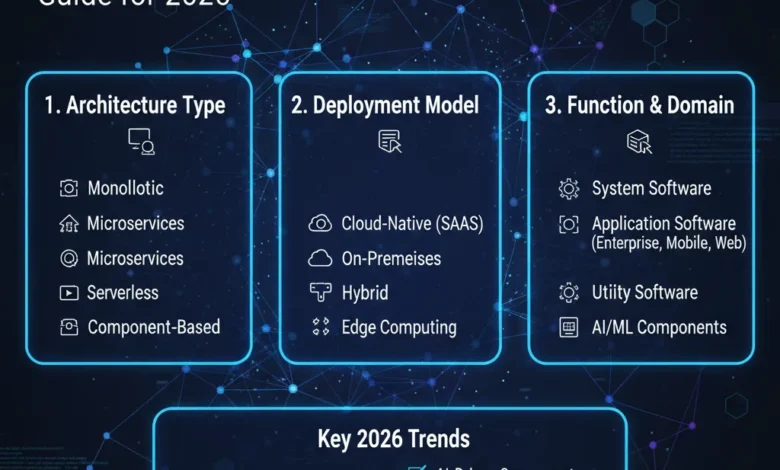
Quick Summary: Classifying software applications components means organising every piece of your software by its function, responsibility, architectural layer, deployment model, and license type. Good classification improves maintainability, scalability, and team collaboration. It tells every developer exactly where each piece of code belongs and why. In 2026, proper classification also covers modern realities microservices, serverless functions, AI components, and cloud-native architecture.
Table of contents
- What Does Classifying Software Applications Components Mean
- The Main Types of Software The Top Level Classification
- What Are the Components of a Software Application
- How to Classify Software Applications Components The Step-by-Step Process
- Layer-Based Classification The Four Architectural Layers
- Classification by Application Type
- Classification by Deployment Model
- Classification by Reusability
- Classification by License Type
- Three Real Examples of Classification Done Right and Wrong
- Common Mistakes When Classifying Software Application
- Tools That Support Component Classification in 2026
- Conclusion
- FAQs
What Does Classifying Software Applications Components Mean
Classification means grouping software components by shared characteristics. It answers a specific set of questions about every component in your system.
What does this component do? Which layer does it belong to? Who owns it? How does it connect to other components? Can another project reuse it? What license governs it?
When you answer these questions consistently across every component, you build a system that is easier to understand, easier to test, and easier to change. When you skip classification, you build a system where every change is a risk and every new developer needs months to find their way around.
Classification is not bureaucracy. It is the difference between a system you can scale and one you cannot.
The Main Types of Software The Top Level Classification
Before classifying components, you need to know which type of software your application is. This is the first classification decision.
| Software Type | Purpose | Examples |
| System Software | Manages hardware and system resources | Windows, Linux, macOS, device drivers |
| Application Software | Performs tasks directly for users | MS Word, Chrome, Photoshop, Slack |
| Programming Software | Used to build other software | VS Code, Eclipse, GCC compiler |
| Embedded Software | Controls hardware devices directly | Washing machine firmware, car ECU |
| Web and Network Software | Enables communication over networks | Web servers, browsers, VPN clients |
Your application almost certainly falls into the application software category. But understanding where it sits in the broader picture helps you make smarter decisions about architecture, licensing, and deployment from day one.
What Are the Components of a Software Application
A software application is not one thing. It is a collection of distinct components. Each component has a specific responsibility. Each one should do one job well and stay out of everything else.
Here are the core components every software application contains.
User Interface Component
This component handles everything the user sees and touches. Screens, buttons, forms, navigation menus, and visual feedback all live here. The UI component captures user input and passes it down to the business logic layer. It displays results back to the user. It does nothing else. The moment you put business rules or database queries inside a UI component, you have broken your classification.
Business Logic Component
This is the brain of your application. It contains all the rules, calculations, workflows, and decision-making that define what your software actually does. A loan approval engine. A pricing algorithm. A tax calculation. An order validation workflow. These all belong in the business logic component not in the UI, not in the database layer. Business logic that leaks into other components causes the most expensive maintenance problems I have seen.
Data Access Component
This component manages all communication with your data store. It retrieves records, inserts new data, updates existing data, and handles deletions. SQL queries, ORM frameworks like Hibernate or Entity Framework, and database connection management all live here. The data access component talks to the database. Nothing else does. When other components talk directly to the database, your data layer loses consistency and your security controls break.
Database Component
This is the data store itself separate from the code that accesses it. A relational database like MySQL or PostgreSQL. A NoSQL store like MongoDB. A cache layer like Redis. A data warehouse like Snowflake. Each database component stores structured or unstructured data and serves it to the data access layer when requested.
Integration Component
Modern software rarely works alone. Integration components handle all communication with external systems. Payment gateways. Third-party APIs. Email services. Cloud storage. Authentication providers. An integration component wraps each external dependency and presents it to the rest of your application through a clean internal interface. When the external service changes its API, you update only the integration component not every part of your codebase that calls it.
Security Component
Security components manage authentication, authorisation, encryption, and data protection across the application. Login systems, session management, role-based access control, API key validation, and data encryption all belong here. Security components are cross-cutting they operate across every other layer. Every request passes through them. They protect everything above and below.
How to Classify Software Applications Components The Step-by-Step Process
I use a consistent five-step process. It works for new systems and for legacy systems you are trying to understand.
1 Inventory everything first
List every module, library, class, function, and service in your application. Do not skip anything. Do not classify yet. Just get everything on the list. You cannot classify what you have not counted.
2 Identify the responsibility of each item
For each item on your list, ask one question: what is the single responsibility of this code? Not what it currently does what it should do. Many components do too many things. Identifying responsibility reveals where your classification problems already exist.
3 Assign each component to an architectural layer
Every component belongs to one of four main layers. Presentation, application, domain, or infrastructure. Assign each item to its correct layer based on its responsibility. If a component spans two layers, it is doing too much and needs to be split.
4 Define reusability
Decide whether each component is reusable across other projects or specific to this one. Reusable components shared libraries, utility packages, common UI kits need stricter interfaces and more careful versioning. Project-specific components can be simpler and more tightly coupled to their context.
5 Document every classification decision
Write down every classification and its reasoning. Use Architecture Decision Records (ADRs), UML diagrams, or whatever documentation system your team uses. Classification without documentation is classification that disappears when people leave the team.
Layer-Based Classification The Four Architectural Layers
This is the most important classification framework for how to classify software applications components. Every professional software system uses it in some form.
Presentation Layer
The presentation layer handles all user interaction. It renders the UI, captures input, sends requests down to the application layer, and displays responses back to the user.
React components, Angular modules, ASP.NET controllers, mobile screens, and API endpoints that serve frontend clients all live here. This layer knows nothing about databases. It knows nothing about business rules and receives data and displays it. So It captures actions and passes them on.
Application Layer
The application layer coordinates use cases. It sits between the presentation layer and the domain layer. It orchestrates workflows and manages transactions. The domain services in the right sequence and ensures that multi-step processes complete correctly or roll back cleanly.
The application layer does not contain business rules. It does not contain database queries. It is a coordinator not a decision-maker.
Domain Layer
The domain layer contains the core business logic of your application. Entities, aggregates, value objects, domain services, and business rules all live here.
This is the most important layer to protect. Domain logic must not depend on the UI, the database, or any external framework. It must be testable in complete isolation. When your domain layer is clean and well-classified, changing your database or your frontend technology requires no changes to your business rules.
Infrastructure Layer
The infrastructure layer handles all technical implementation details. Database connections, file storage, external API clients, messaging systems, email providers, and cloud services all live here.
The infrastructure layer serves the domain layer. It implements interfaces defined by the domain. The domain layer never depends on the infrastructure layer directly the dependency always flows inward, toward the domain.
Classification by Application Type
Software applications themselves fall into distinct categories based on what they do and who uses them.
| Application Type | Description | Examples |
| Productivity Software | Helps users complete tasks efficiently | MS Office, Google Docs, Notion |
| Business Software | Manages enterprise processes and data | ERP systems, CRM platforms, HRMS |
| Educational Software | Supports learning and training | Moodle, Duolingo, Khan Academy |
| Communication Software | Enables messaging and collaboration | Zoom, Slack, Microsoft Teams |
| Multimedia Software | Creates and plays media content | Photoshop, VLC, DaVinci Resolve |
| Entertainment Software | Games and streaming applications | Steam, Netflix app, Spotify |
| Scientific Software | Supports engineering and research | MATLAB, AutoCAD, ANSYS |
| AI and ML Software | Processes data with machine learning | TensorFlow platforms, ML pipelines |
Knowing which category your application belongs to shapes every other classification decision. An entertainment application has different performance, security, and scalability requirements than an enterprise ERP system.
Classification by Deployment Model
In 2026, how your software deploys is as important as what it does. Deployment model shapes your component architecture significantly.
Desktop Applications run locally on a user’s machine. Components manage local resources, file system access, and offline functionality. Installation and update management are critical concerns.
Web Applications run in browsers and on servers. Components separate clearly into client-side frontend code and server-side backend services. State management, session handling, and API design are central classification concerns.
Mobile Applications run on iOS or Android devices. Components manage device resources, battery consumption, network reliability, and offline mode. Platform-specific components sit alongside shared business logic.
Cloud-Native Applications deploy to cloud infrastructure as microservices, containers, or serverless functions. Each service is a self-contained component with its own data store, its own deployment pipeline, and its own scaling rules.
Microservices take component classification to its logical conclusion. Each business capability becomes an independent service its own codebase, its own deployment, its own team. Classification boundaries become service boundaries. Getting them wrong is expensive to undo.
Serverless Functions are individual function components that run on demand. They have no persistent state. They scale automatically. Classification focuses on single responsibility each function does one thing and returns.
Classification by Reusability
Every component in your system falls into one of three reusability categories.
Reusable Components work across multiple applications or projects without modification. Shared UI libraries, logging frameworks, authentication modules, and utility packages are examples. These need stable interfaces, semantic versioning, and thorough documentation. They must not contain application-specific business logic.
Configurable Components work across multiple contexts with configuration changes. A payment integration component that supports multiple payment providers through configuration is a good example. The component is the same. The behaviour changes based on what you configure.
Non-Reusable Components are specific to one application and one context. Application-specific business rules, domain entities unique to your problem space, and project-specific workflows belong here. Trying to make these reusable prematurely adds complexity without benefit.
Classification by License Type
Every software component carries a license. Ignoring license classification causes legal risk. I have seen organisations unknowingly violate open source licenses in production systems, creating significant liability.
| License Type | Meaning | Examples | Risk Level |
| Proprietary | Closed source, cannot modify or redistribute | Windows, Adobe software | Low risk if licensed correctly |
| Open Source (Permissive) | Free to use, modify, distribute with minimal restrictions | MIT, Apache 2.0 licensed libraries | Very low risk |
| Open Source (Copyleft) | Must release modifications under same license | GPL licensed components | High risk if used in proprietary software |
| Freeware | Free to use, cannot modify source | Skype, many utilities | Low risk |
| Shareware | Trial period, requires purchase for full use | WinRAR | Low risk |
| SaaS Subscription | Cloud-hosted, recurring fee, vendor controls | Salesforce, Twilio, Stripe | Moderate risk vendor dependency |
Classify every third-party dependency by its license. GPL components in a proprietary commercial application create serious legal exposure. Audit your component licenses regularly using tools like FOSSA, Black Duck, or Snyk License Compliance.
Three Real Examples of Classification Done Right and Wrong
A Fintech Startup That Got It Right
I worked with a fintech startup building a loan management platform. From day one, they separated business logic loan eligibility rules, interest calculations, compliance checks into a pure domain layer with zero infrastructure dependencies. When regulators required changes to eligibility calculations six months later, the team updated one domain service. Nothing else needed to change. The fix took two days instead of two months.
An Enterprise Team That Got It Wrong
I analysed a legacy enterprise application where developers had put database queries directly inside UI event handlers. A button click fetched data, applied business rules, updated the database, and rendered results all in one function. Every change to any business rule required touching the UI code. Every UI update risked breaking database interactions. Testing was impossible without a live database connection. Untangling it cost eighteen months of refactoring. Proper classification from the start would have cost nothing.
A SaaS Platform That Reclassified Mid-Growth
A SaaS platform launched as a monolith with poorly defined component boundaries. It grew to 50,000 users and the single deployment became a bottleneck. They hired an architect who inventoried every component, assigned clear layer ownership, identified which components had become too large and mixed too many responsibilities. They split six bloated components into twenty clean ones over twelve weeks. Then they extracted three of those as independent microservices their reporting engine, their notification system, and their billing module. Each extracted component had clear enough classification that the extraction took days rather than months.
Common Mistakes When Classifying Software Application
Mixing business logic with the UI. This is the most common mistake. Developers put validation rules, calculations, and workflow decisions inside React components or controller methods. The logic becomes impossible to test in isolation and breaks every time the UI changes.
Letting the domain layer depend on infrastructure. When domain entities import database libraries or call external APIs directly, the domain becomes untestable without live infrastructure. Every architecture principle in modern software engineering prevents this dependency direction.
Over-fragmenting components prematurely. Teams that read about microservices split everything into tiny services before they understand their domain boundaries. The result is distributed complexity without the benefits of distribution. Classify first, extract second.
Skipping documentation. Classifications that exist only in developers’ heads disappear when developers leave. Document every classification decision and the reasoning behind it. Future team members need to understand not just where things are but why they were put there.
Ignoring license classification. Third-party component licenses get ignored during fast development cycles. GPL components end up in proprietary commercial products. Freeware libraries end up in SaaS platforms in violation of their terms. License classification is not optional it is a legal obligation.
Also Read: Error 207 AMD Software: Complete Fix Guide for 2026
Tools That Support Component Classification in 2026
Dependency Management: Maven, Gradle, npm, and Poetry track component dependencies and versions. They make dependency graphs visible and manageable.
Architecture Visualisation: UML tools, the C4 model, Structurizr, and Lucidchart make component relationships visible. You cannot classify what you cannot see.
Static Analysis: SonarQube, NDepend, and ArchUnit enforce architectural rules automatically. They flag when a domain component imports an infrastructure library and fail your build when classification boundaries get violated.
License Compliance: FOSSA, Black Duck, and Snyk License Compliance scan your component dependencies and flag license violations before they reach production.
Architecture Decision Records: ADR tools like adr-tools or Backstage capture classification decisions with their context, the options considered, and the reasoning for the chosen approach.
Conclusion
How to classify software applications components is not an abstract academic question. It is a practical engineering discipline that determines whether your software grows cleanly or collapses under its own complexity.
Start with inventory. Assign responsibility. Place every component in its correct architectural layer. Define reusability clearly. Document your license obligations. Document every decision.
Teams that classify their components correctly build systems that scale, stay maintainable, and survive years of changing requirements. Teams that skip classification build systems that become progressively harder and more expensive to change until changing them becomes impossible.
Classification is the foundation. Everything else you build stands on it.
FAQs
What does it mean to classify software applications components?
Classifying software applications components means organising every piece of your software by its function, responsibility, architectural layer, deployment model, and license type.
What are the main components of a software application?
The main components are the user interface component, the business logic component, the data access component, the database component, integration components for external services, security components for authentication and authorisation, configuration components for environment settings.
What are the four architectural layers for classifying software components?
The four architectural layers are the presentation layer, which handles user interaction the application layer, which coordinates use cases and workflows the domain layer.
How do you classify software based on license type? Software components fall into five main license categories: proprietary (closed source, cannot modify), permissive open source (MIT, Apache free to use and modify), copyleft open source, freeware and SaaS subscription (cloud-hosted with recurring fees).
What is the difference between reusable and non-reusable software components?
Reusable components work across multiple applications or projects without modification shared UI libraries, authentication modules, and logging frameworks are examples.